
Watermark Logo - Protect Files
macOS
$6.99

About Watermark Logo - Protect Files
Your photos deserve your name on them. Watermark Logo makes it effortless — drag your logo onto any image, adjust it live, and batch-export hundreds in one click. The fastest way to brand and protect your creative work on macOS.

DESIGNED FOR CREATIVES
Whether you're watermarking client proofs, branding portfolio shots, or protecting mockups before sharing, Watermark Logo fits right into your workflow.

DRAG-TO-POSITION WATERMARKS
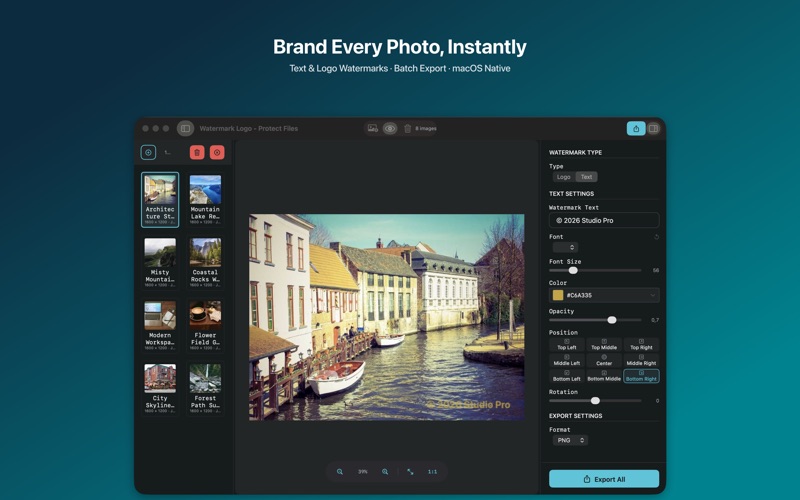
• Place your watermark exactly where you want it — drag it live on the preview
• Fine-tune opacity, scale, and rotation in real time
• See every adjustment instantly before you commit

LOGO WATERMARKS
• Import your brand mark in PNG or JPEG
• Scale from subtle to prominent — 10% to 80% of the image
• Perfect for monograms, agency logos, or studio marks

TEXT WATERMARKS
• Custom text with any system font, 12pt to 200pt
• White, black, gray, or red — plus adjustable opacity
• Rotate from −90° to 90° for diagonal or angled placement

BATCH PROCESSING — UP TO 500 IMAGES
• Import an entire shoot at once
• Apply the same watermark to every file in seconds
• One-click export to your chosen output folder

EXPORT IN ANY FORMAT
• PNG, JPEG, TIFF, or BMP
• Adjustable JPEG compression quality
• Drag and drop files in, get watermarked files out

NATIVE macOS APP
• Built for Mac — lightweight, fast, no subscriptions
• Three-panel layout: file browser, live preview, inspector
• Keyboard shortcuts for efficient workflows
• Works completely offline — your images never leave your Mac

PERFECT FOR:
• Photographers delivering client galleries and proofs
• Designers protecting creative work and mockups
• Studios branding portfolio images before publishing
• Businesses securing confidential visual documents
• Content creators adding signature marks to social media

Your creative work has value. Make sure it carries your name.

Download Watermark Logo and start branding your photos today.
Screenshots