
CodeGet
macOS
$9.99

About CodeGet
You have a campaign flyer to finish, a business card to brand, or a social media post that needs a QR code — and it has to look professional, not like a default black-and-white grid from a free website. CodeGet is the Mac-native QR code generator built for anyone who takes their visual identity seriously.

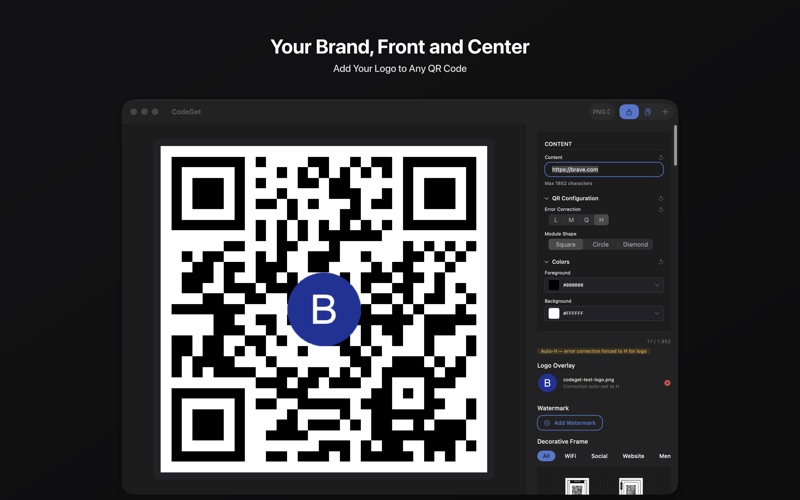
Enter any text, URL, or data, and your QR code appears within 300ms — live as you type. Then make it yours: choose custom foreground and background colors, add your logo at the center, or apply a watermark image. Pick from three distinct shapes, browse 100 decorative frames across 10 categories, and export in your preferred format. Every code you create is uniquely branded and ready to share.

FULL CREATIVE CONTROL

▸ Three Shapes — Square, Circle, and Diamond to match your brand aesthetic
▸ Custom Colors — Set foreground and background colors with live preview
▸ WCAG Contrast Check — Warns you before export if your color combination fails accessibility standards
▸ Logo Overlay — Place your brand logo at the center; error correction auto-elevates to ensure scannability
▸ Watermark Overlay — Layer a semi-transparent watermark on top of your QR code at 35% opacity for distinctive brand presence
▸ 100 Decorative Frames — Browse 10 categories: WiFi, Social, Website, Menu, Payment, Promo, Event, Info, Booking, and Review
▸ Error Correction — Four levels ensure reliable scanning, even with logos or partial coverage

EXPORT YOUR WAY

▸ Six Formats — Save as PNG, JPEG, JPEG 2000, TIFF, BMP, or HEIC
▸ High Resolution — Sharp, print-ready codes for any medium
▸ Save As… Modal — Press Export, choose your file location and name, then use Show in Finder to open the saved file directly

MADE FOR YOUR WORKFLOW

Whether you are creating branded codes for marketing campaigns, sharing Wi-Fi passwords and menus at your restaurant, distributing event check-in codes, or linking customers to your website — CodeGet handles it without subscriptions, without watermarks, and without uploading your data to external servers. Everything stays on your Mac.

HOW IT WORKS

1. Enter your content — any URL, text, Wi-Fi credentials, or data.
2. Choose your error correction level for scan reliability.
3. Pick a shape and set your colors to match your brand.
4. Add your logo, a watermark, or one of 100 decorative frames.
5. Export in your preferred format.

Download CodeGet and create professional, branded QR codes directly on your Mac.
Screenshots