 BraveCL

Logo & Frame QR Code Maker
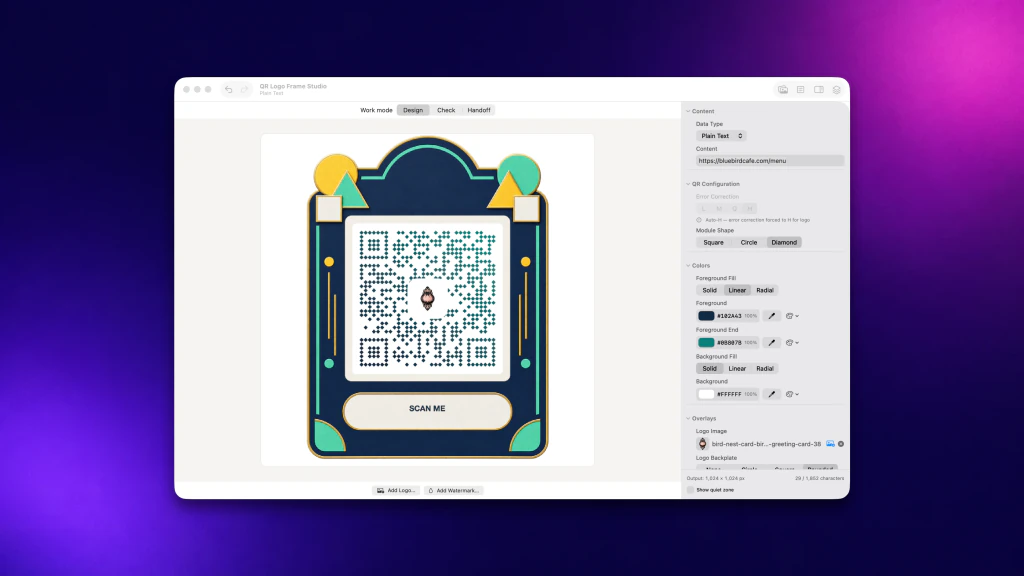
Give each QR code a client look with a logo, brand colors and one of 100 frames. Check the design, then save PNG, PDF or SVG files without overwriting existing work.
Only on Mac for now.
- Category
- Utilities
- Platforms
- Latest version
- 4.0

What Logo & Frame QR Code Maker does
Add a logo and brand colors
Place a logo in the code, then set the foreground and background colors or gradients. Choose square, round or diamond modules.
Set the print size
Set the artwork width in millimeters or inches, and see the QR module size and four-module clear margin before handoff.
Check the current design
Run the checks to see whether the decoded content matches the original link. Checks do not cover every camera or printed surface.
Batch codes from a CSV or TSV
Use one saved visual style across CSV or TSV rows. Map a source column to the URL field, preview a sample, and retry failed rows.
How it works
Step 1 of 4
Design the code
Choose the content type, add a logo, pick colors and a frame, and select the module shape.
Step 2 of 4
Set the size
Enter the artwork width in millimeters or inches.
Step 3 of 4
Check the design
Run the checks on the current design, or on a PNG, JPEG or TIFF image returned by a client.
Step 4 of 4
Save the files
Review the output names and formats, then export PNG, PDF or SVG. New files are created beside existing ones.
Guides for Logo & Frame QR Code Maker
Solve a practical task with Logo & Frame QR Code Maker, from the first step to the result.


Platforms and requirements
macOS
- Store
- Mac App Store
- Version
- 4.0
- Requires
- macOS 14.0 or later
- First released
- Sep 1, 2021
- Last updated
- Oct 30, 2026
- Purchase
- One-time purchase: $9.99 in the Mac App Store
- Seller on the Mac App Store
- BraveCloud
Details
- Size
- 42 MB
- Languages
- 43 languages
- Account
- Not needed to use the app
Questions
Does it change my original files?
No. New files are created without replacing unrelated existing files, so existing work is kept.
Which formats can it save?
PNG, PDF and SVG. Before export the app warns you or refuses a format that cannot keep an active design element.
Does it create tracked or redirect links?
No. These are static QR codes, not hosted redirects or scan-analytics services.
More utilities
 Duplicate Image DetectorScan a folder for exact and look-alike copies. Compare each group side by side and pick the one to keep.Utilities
- macOS
 Merge PDF with BookmarksMake one ordered PDF packet from separate handouts. Replace revised files and add section bookmarks before saving.Utilities
- macOS
 Image Base64 EncoderCopy complete snippets, with the original bytes unchanged. Choose Raw Base64, Data URI, HTML, CSS or Markdown.Utilities
- macOS
Need help with Logo & Frame QR Code Maker?
Install and refund help for each store, and a form that reaches the developer.