BraveCL
How to make a capybara reaction meme on Mac
Choose a capybara meme template, replace the top and bottom captions, and check a square PNG ready to share.
- What you'll achieve
- You will have a square capybara reaction meme that reads EVERYTHING IS URGENT at the top and I DISAGREE at the bottom.
- What you need
- MemeProducer 3.0 for Mac, with access to its built-in meme template gallery.
- No imported photo is required; this guide uses a picture included in the gallery.

MemeProducer includes a searchable gallery of pictures, so you can make a reaction meme without first finding or importing a photo. This walkthrough uses the capybara in a hot spring template from the app and adds two contrasting captions.
1.Open the meme template gallery
Click Browse templates to open the Meme Templates gallery. The gallery shows built-in pictures, including the capybara in a hot spring.

MemeProducer's Meme Templates gallery open over a previous turtle meme, with the capybara template visible. 2.Choose the capybara picture
Select the picture named Capybara sitting perfectly calm in a hot spring. It replaces the starting photo in the editor while keeping the caption fields available.

Capybara in a steaming hot spring fills the meme canvas, with editable top and bottom captions in the right inspector. 3.Write the top caption
In the inspector, replace the Top caption with EVERYTHING IS URGENT. The new words appear across the top of the capybara photo.

Capybara meme showing EVERYTHING IS URGENT at the top, while the right inspector contains the new Top caption. 4.Write the bottom caption
Replace the Bottom caption with I DISAGREE. Check that the shorter line appears along the lower edge of the picture.
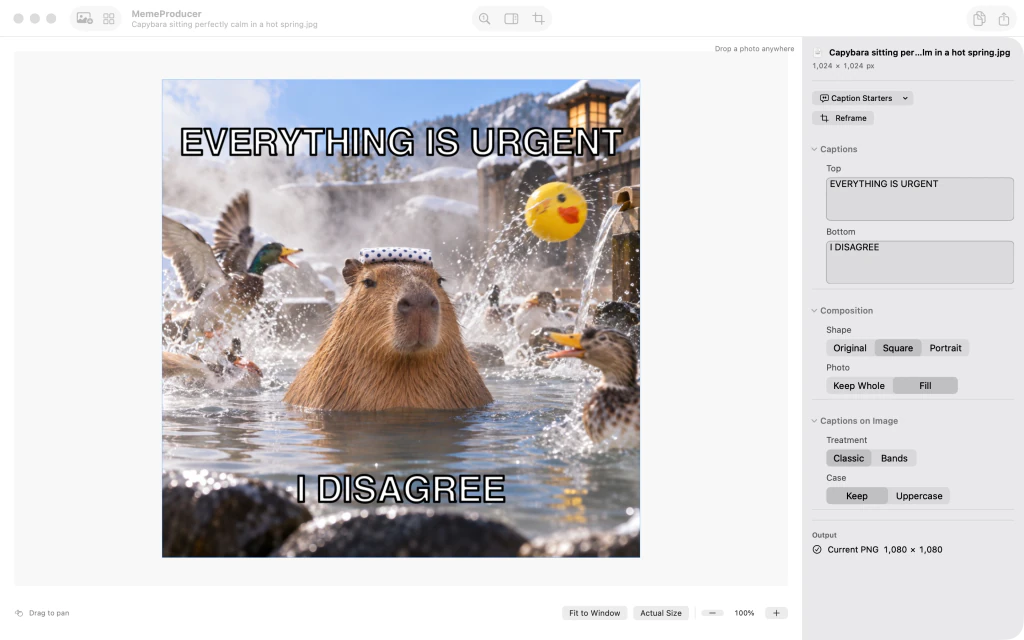
Capybara meme with EVERYTHING IS URGENT above and I DISAGREE below, matching the inspector's Bottom field. 5.Confirm the square composition
Under Composition, confirm Shape is set to Square and Photo is set to Fill. Both options may already be selected; the preview shows the final square framing.

Capybara reaction meme framed in a square, with Shape set to Square and Photo set to Fill in the right inspector. 6.Review the finished meme
Under Captions on Image, leave Treatment on Classic and Case on Keep. Check the finished image and the Output PNG status before copying or sharing it.

Finished square capybara reaction meme with EVERYTHING IS URGENT and I DISAGREE, Classic caption treatment and PNG output.


After the last step
Its composition and caption settings are visible before you copy or export the PNG.
Tips
Use the Top and Bottom fields to edit the words independently while watching the canvas.
If the template already uses Square or Fill, leave those options selected; no extra change is necessary.
Keep the Classic caption treatment to match the pictured result.
Watch outThe gallery opens with the previous sample image still behind it; choosing the capybara replaces that image.
Watch outThis walkthrough verifies the final PNG preview, but does not demonstrate a system sharing dialog.